
Outlook went down on Thursday afternoon and was still unreliable on Friday. Microsoft says it has no indication of cyber activity behind it. Every help desk fields lockout calls in an outage, and most of those callers are real.
An outage hands a caller the perfect pretext: I am locked out, I cannot work, reset me now. Your logs will record the reset. They will not record the call that earned it. The transcript is the only artifact that does, and almost no SOC keeps it.
Why an outage works on a help desk
Three things change on the day the platform breaks:
- The call is expected. One more person who cannot get in does not stand out, because everyone cannot get in.
- The urgency is believable. People cannot work, managers are escalating, and the agent is measured on restoring access fast.
- The normal checks are the ones the outage degrades. Callback numbers, email approvals and authenticator prompts all depend on the systems that are down.
That is how the work runs. Further down is what I found when I checked.
What the public record shows, and what it does not
After the 2024 CrowdStrike outage, CISA said threat actors were using the incident for phishing and other malicious activity. There were also reports of people posing as CrowdStrike staff on phone calls. In those cases the attacker called the user and pretended to be the vendor.
I found no public case of an attacker calling a help desk and using an outage as the reason to get a reset. There are two readings. Either it does not happen, or it happens and nobody can see it. The second is the one to plan for, and that is my inference, not a finding.
What I found when I checked
I ran a test. I had the privileged activity logs and the call transcripts side by side. I wanted to see if I could tie each reset to the call behind it.
Two is a small number, and I tried because I had a theory, so I am not claiming a rate. The logs told us a reset happened. Transcripts were the missing context.
What your logs show
Your help desk resets the password on an admin account. The caller was not the admin. Your logs show the reset, the new sign-in, the PIM elevation, and a mailbox rule created four minutes later. They show everything except how the caller got past a person whose job is to say no.
During an outage that reset sits inside a spike of legitimate resets. No rule fires, because nothing about it is anomalous. That is the point of the cover.
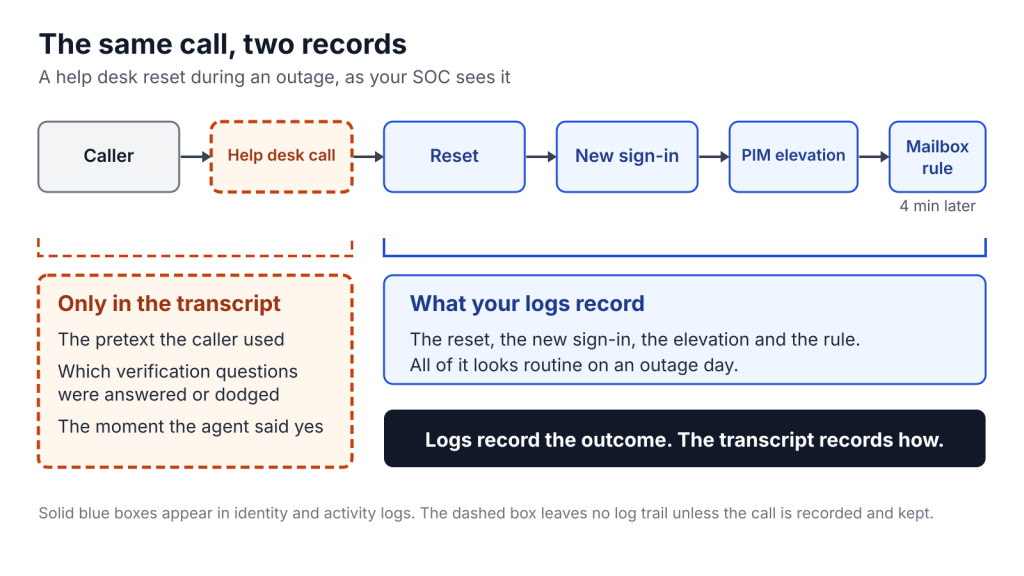
What the transcript gives you
Now you are the IR lead and you have the transcript of that call. You can read the pretext, see which verification questions were answered and which were dodged, and find the moment the person gave in. You can search every other call from the outage window for the same phrasing.
- Scope. Search for the same pretext, the same claimed identity, the same urgency across other calls. One compromised account becomes a count of attempts, including the failed ones.
- Fix. You can see which control failed: the script, the agent’s discretion, or a missing step.
- Attribution. The wording and the pressure tactics are intelligence. They feed your threat intel the way an indicator does.
Conversation data answers the question every investigation eventually asks and no other log can: why did the person on the other end say yes?
Why you do not have that transcript today
For years every log had to justify its ingest cost, and the only justification that fit on a budget line was a detection rule. Conversation data fails that test. Language is ambiguous, rules are brittle, and false positives burn analysts. No rule would have fired on the call above, which is exactly why nobody kept it.
That test assumed storage was the constraint. At BSides NYC I argued it no longer is. When storage costs a fraction of what it did, the question becomes what a source is useful for. Every source has three jobs. Score each from 0 to 3:
- Detect: can you write a reliable, low-noise rule on it?
- Investigate: does it answer who, why, and how far once you are already looking?
- Respond: does it tell you what to contain, revert, or notify?
Conversation data scores low on detect, high on investigate, high on respond. In Sentinel, that profile fits the data lake tier: cost-effective retention for forensics and hunting, queryable with KQL jobs and notebooks, up to 12 years total. The tradeoff is that analytics rules and custom detections do not run on lake-only data, and queries are slower and not free.
The objection you should take seriously
The strongest objection is not technical. Your contact center already records calls for quality assurance, so the collection exists. What changes is the purpose, and a new purpose raises consent, privacy and discovery questions that a QA notice may not cover. Consent rules vary by jurisdiction, and in some places every party must agree, so don’t take this as gospel, but there are ways to minimize privacy concerns:
Bind the data to four controls:
- Declared purpose. Write down that recordings are used for security analysis, and confirm your notice and legal basis cover it.
- Retention cap. Keep transcripts for a fixed period tied to your investigation window.
- Logged access. Closed by default, opened for a declared incident, every query logged.
- Human review. No action against a caller or an employee rests on a pattern match alone.
Start with data you already hold. QA teams often score whether a person completed identity verification. Those scorecards are a labeled set of verification failures you can work from before you build anything new.
What Microsoft documents today, and where it stops
Two parts of Microsoft’s public documentation touch this attack.
The first is detection. Defender for Office 365 has a SyntheticMediaDetectionEvents table in advanced hunting. It records deepfake detections in Microsoft Teams, and you can join it to call activity on the call ID. It only fills if you use an approved detection engine: Microsoft’s own, or a third party such as GetReal, Pindrop, Reality Defender or Resemble AI. Hunting on it needs Plan 2.
The second is prevention. Microsoft documents a verified help desk pattern in which the caller proves who they are with a Verified ID credential and a Face Check before the agent resets anything. Face Check is a premium feature, included in Entra Suite or sold as an add-on.
Neither covers the call in this post. The detection table is scoped to Teams, so a phone line into a help desk on another system sits outside it. The verified help desk only protects the calls you route through it. For every other call, the transcript is still the only record of what was said.
What to do on Monday
Pull every privileged reset your help desk performed during the outage window. For each one, ask whether you can produce the call. Listen to ten. Note what the agent verified and what they accepted instead.
If you cannot produce the call, you have found the gap this post is about.


Leave a Reply