
Every person in your building went through a process to get a badge. Someone checked who they were. Someone approved where they could go. Every swipe is logged, and when the badge is revoked, the doors stop opening.
Your AI agents skip all of that. No badge, no problem. Until something goes wrong and the SOC has to work out what the agent did.
That was my argument at Cloud Identity Summit in Frankfurt this week, and it fits in one sentence: the SOC inherits whatever identity data you give it, so that data has to be designed in when the agent ships, because you cannot rebuild it after the incident.
My teams sit downstream of every identity decision made by the people in that room. Here is what we need from them at three points: before the agent ships, while it is built, and when it ends up in an incident.
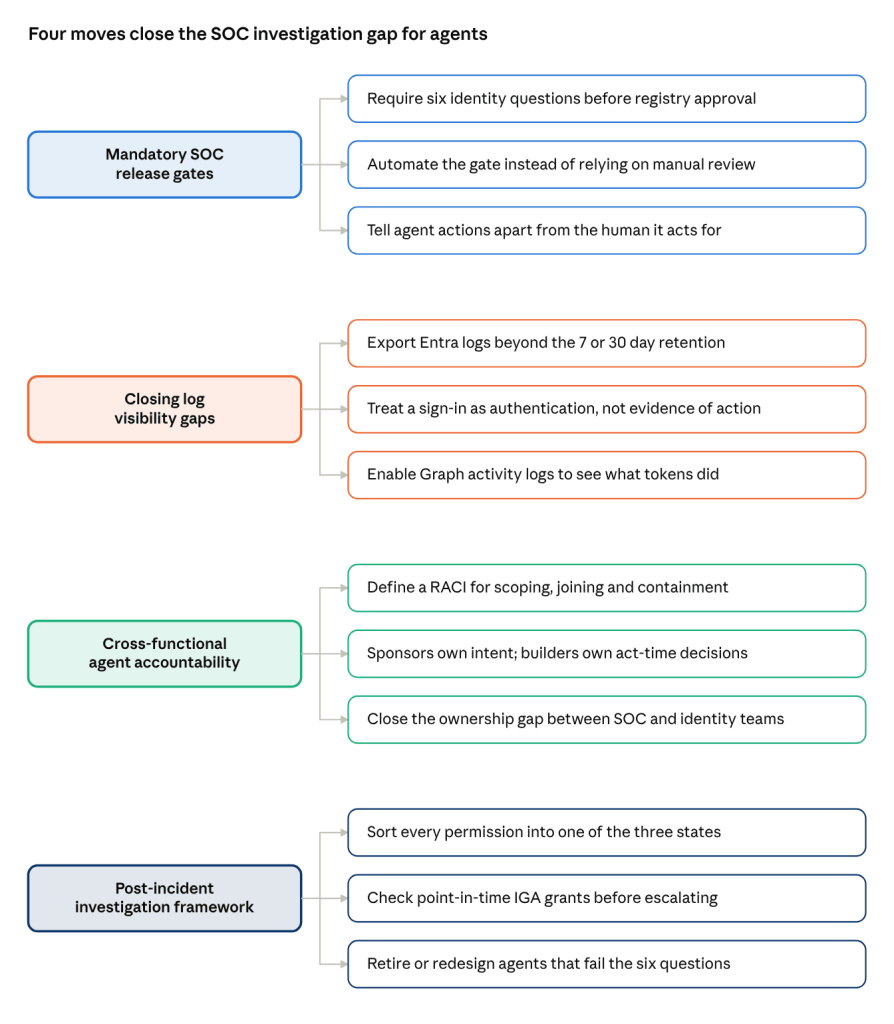
The rest of this post walks through each move: the gate before ship, the log gaps, who owns what, and how to investigate once something goes wrong.
Before ship: monitoring readiness is a gate, not a review
When an agent touches data it shouldn’t, the SOC needs three answers. What did it do? Was it allowed? Who authorized it? Sign-in logs answer none of them. A sign-in proves a token was issued. It does not tell you what the token touched.
“We collect sign-in logs” also isn’t one thing. Microsoft Entra splits sign-ins into interactive, non-interactive, service principal and managed identity categories, and each one is routed separately in diagnostic settings. What a token actually did against Microsoft Graph lives in Graph activity logs, which need Entra ID P1 or P2 and a setting of their own. Miss one and your SIEM won’t tell you. It will happily answer questions about the data it has.
The gaps stay silent for four reasons:
- A sign-in is not an action. Authentication evidence and action evidence answer different questions.
- Some activity has no sign-in at all. First-party app-only sign-ins are excluded from the service principal logs by design, so their Graph calls show up unattributed.
- Cost drives logs out. Non-interactive and service principal sign-ins can run 5 to 10 times the volume of interactive ones. “We don’t have a detection for it” becomes the reason not to collect it. Investigations need evidence that never fired an alert.
- Retention ages it out. Entra keeps activity logs 7 days on Free and 30 days on P1 or P2. If you don’t export them, they’re gone.
There will not be time to pretend your citizen developers are reviewing service principal permissions before they ship.
Agents ship faster than review, and most get rubber-stamped or skipped. So stop treating monitoring as a review. Make it a gate. Before an agent goes live, or into your agent registry, it answers six questions:
- Which identity type does it run as?
- Is that sign-in category streamed to the SIEM?
- Are Graph activity logs on?
- Is retention longer than your time to investigate?
- Can the SOC tell the agent apart from the human it acts for?
- Is there a record of who approved its access?
If it can’t answer them, it doesn’t ship. You don’t have enough reviewers to check this by hand, so automate it. Write the checks as custom tests in Maester, shoutout to Merrill Fernando, or build an agent that checks them and give it to your citizen developers as a co-pilot. That agent has to pass the same six questions.
At build: IGA holds half the investigation
An agent investigation needs four sources:
- Entitlements: what could it do?
- Grant decisions: who approved that access, and why?
- Sessions: what did it actually do?
- Act decisions: why did it take this specific action?
Your IGA platform, whether that’s Entra ID Governance, SailPoint or Saviynt, already holds the first two. Every Entra agent identity needs a human sponsor, and its access comes through time-bound access packages. Sign-in and Graph activity logs hold the third. Nobody holds the fourth. IGA holds the grant-time decision. Nobody holds the act-time one.
Joining these is more practical than it sounds. Microsoft carries two linkable identifiers from Entra tokens into Graph activity logs, Microsoft 365 workload audit and Entra audit: a session ID that follows everything from one sign-in, and a unique token ID that follows one token. Microsoft documents the session ID as created at interactive sign-in. An app-only agent never signs in interactively, so expect to follow it one token at a time.
Two pieces of community work make the join usable. Thomas Naunheim’s WorkloadIdentityInfo classifies workload identities by privilege tier. Merill Fernando’s Graph Permissions Explorer maps each permission to the APIs it exposes. One rule holds it together: compare activity to the entitlement as it stood when the action happened, not as it stands today.
Every permission then lands in one of three states:
- Seen and permitted: inside scope. Check the intent.
- Seen, not permitted: check the point-in-time grant before you escalate. A stale IGA snapshot is a false positive, not an incident.
- Permitted, not seen: it is unused, unlogged, or unknown, and you can only call it unused if you proved your logs were complete.
That third state is your continuous improvement loop. Unlogged goes back to security engineering to fix collection. Unused goes back to the agent owner to remove the permission. Unknown needs a human to adjudicate. Run it through the exceptions process your SOC already has, because your environment never stops changing.
One limit, said plainly: none of this catches misuse inside granted scope. A prompt-injected agent using a permission it legitimately holds looks normal here. That needs other controls.
At incident: split the work before the incident does it for you
The ConnectWise Cloud Backup compromise last month shows the stakes. A stolen credential signed in as the backup app, which Huntress saw reach 162 Microsoft 365 tenants. In some tenants the apps granted themselves Global Administrator and added secrets to other apps. Tenants with Graph activity logs could prove what the token did and didn’t do: one MSP matched the token against its Graph activity logs and showed nothing was done with it, according to CIAOPS. Without those logs, a sign-in with no audit entries proves nothing.
The work splits across four parties: the identity and IGA team, the agent’s sponsor, its technical owner, and the SOC. Microsoft already separates sponsor and owner: the sponsor holds business intent and can authorize suspension, and the owner handles operations and recovery. Write down who is responsible for scoping, checking fidelity, running the join, pulling decision records and containing. Most organizations have never had that conversation, so one role ends up doing all of it.
None of this is new
In Q&A someone asked whether this only applies to agents. It doesn’t. It applies to every non-human identity. Agents just make the problem visible. The activity is usually logged somewhere. The gap is accountability.
My one ask: make SOC readiness a ship gate for agents. Your SOC is fed up with being introduced to a new identity in the middle of an incident. Talk to them before that happens.


Leave a Reply